Life Application Study Bible
- 4.7
- Rating
- 10.00K
- Installs
- $19.99
- Price

 Analysis by App-foxy
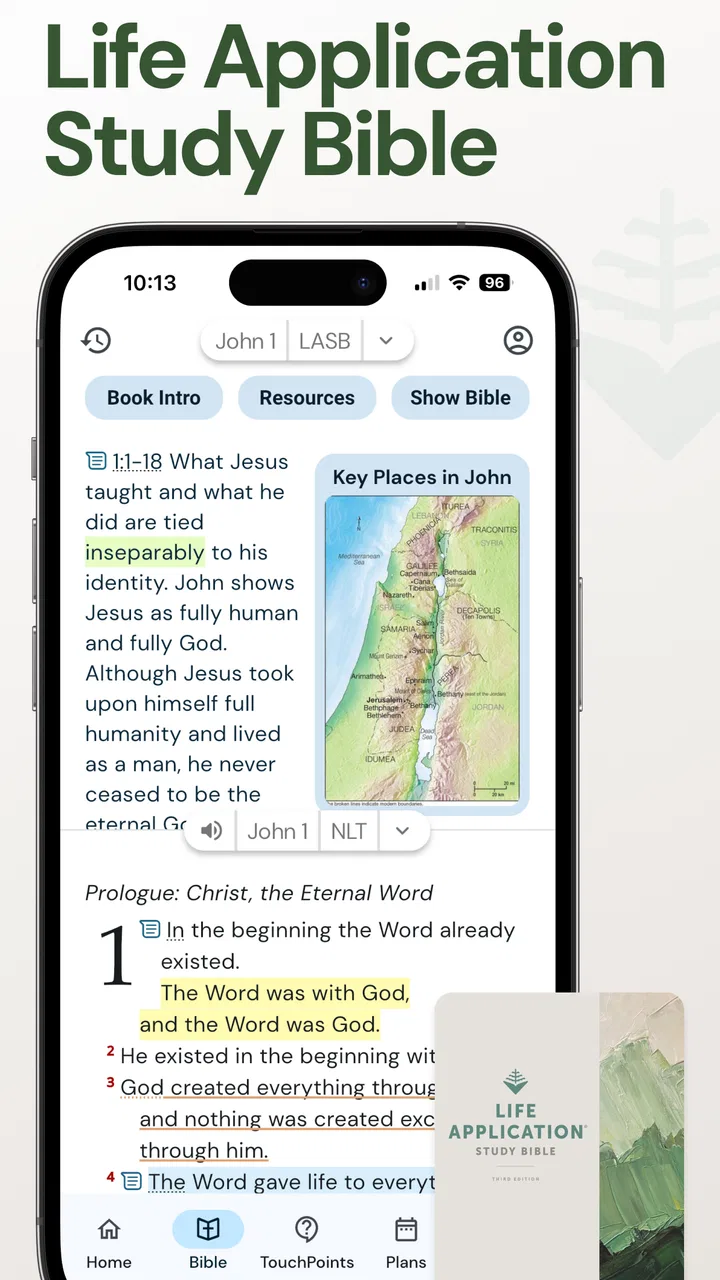
I approached Life Application Study Bible as I would any serious Bible reference tool: not as something to open only when I have a spare minute, but as a companion for moving from a question to a clearer reading of Scripture. The app comes from Tecarta, Inc. and sits in the Books & Reference category, with a 4.7 average from around 2.4 thousand ratings. That reputation makes sense once you spend time with its central idea: it tries to connect the biblical text with practical understanding through a large collection of explanatory notes.
The starting condition is usually familiar. I may be reading a passage and understand the words but not the setting, the argument, or the reason a verse matters beyond its immediate sentence. A regular Bible app can show the text quickly, and a printed Bible can offer a dependable reading experience, but both can leave me doing the connecting work alone. This app is designed for the moment when I want to stay close to the passage while also asking, “How does this fit together, and what should I take from it?”
From a question to a more useful reading session
I find it useful to treat a question as the starting point for a focused session, rather than opening notes simply because they are there. Naming what I want to understand helps me decide whether the explanation has clarified the passage or merely given me another idea to consider. From there, I can carry that question into a closer reading of the surrounding text.
You May Also Like

 Blood Strike: 2.5 Anniversary
Blood Strike’s Loadouts Turn Every Drop Into a Tactical Gamble
A close look at Blood Strike’s custom loadouts: how fast access to signature weapons reshapes its battle royale rhythm, rewards preparation, and narrows the gap between fights.

 Pandora - Music & Podcasts
Pandora’s Music Is Easy to Start, but Harder to Recover
Pandora’s strength is its low-effort path from a seed to a station. Its weak spot is how much confidence it asks you to place in connection, setup, and quiet recovery.

 8 Ball Pool
8 Ball Pool Is Built on Rivalries, Rematches, and Routine
A close look at the rivalries, rematches, shared routines, and unanswered safety questions that turn a quick pool match into a persistent mobile community.

 Samsung Music
Samsung Music’s Quiet Strength Is Playing What You Already Own
Its reach comes less from spectacle than from dependable access to a personal library. That simplicity is both the app’s strongest retention engine and its ceiling.

 AccuWeather: Weather Radar
AccuWeather Review: A Quick, Clear Forecast for Everyday Decisions
For everyday plans, the best forecast is the one you can understand quickly. AccuWeather makes rain timing, radar, and local conditions easy to act on, with a few trade-offs.

 Hill Climb Racing
Why Hill Climb Racing Still Turns Crashes Into One More Run
A tiny car, a bumpy hill and one more upgrade: Hill Climb Racing keeps resurfacing because its simple chaos makes every near-miss feel personal.
More From Our News Desk
View All News


Beginning with the passage rather than a separate commentary
What I like about the workflow is that the study material is attached to the Bible-reading experience instead of forcing me to jump between unrelated tools. I can begin with a book, chapter, or familiar verse, read the surrounding passage, and then move toward the explanatory material when I need help. That order matters. It encourages me to read the text first rather than immediately accepting someone else’s interpretation.
The app’s defining promise is its collection of over 10,000 Life Application notes and related study features. In practice, that makes it feel less like a bare digital edition and more like a guided reference library. The notes are especially useful when I am trying to understand a passage in context, identify a practical theme, or slow down at a section that feels difficult. The strongest workflow is text first, explanation second, personal application last.
I would not treat every note as a replacement for careful reading. Instead, I use it as a handoff between observation and reflection. First I notice what the passage says. Then I consult the note to see what background or application angle I may have missed. Finally, I return to the passage and decide whether the explanation genuinely helps me read it more clearly.
A realistic morning study routine
Imagine a weekday morning when I have a short reading plan but do not want to rush through it. I open the selected passage, read it once without interruption, and mark the sentence that raises a question. Rather than searching the wider internet and sorting through unrelated results, I use the study material placed alongside the biblical reading. That keeps the session focused and reduces the chance of drifting into a dozen competing interpretations.
After reading the note, I write down one point that seems relevant to the situation I am facing. The important outcome is not simply collecting information. It is leaving the session with a more precise question, a better understanding of the passage, or a practical change I can consider. This is where the app works best for me: it creates a bridge from reading to reflection without pretending that a digital tool can make the decision on my behalf.
For a small-group leader, the same flow can be more deliberate. I can read the passage early, review the explanatory material, compare the note with the wider context, and arrive with a few discussion prompts. The app is helpful here because it supports preparation without requiring a full shelf of reference books. It does not eliminate the need for judgment, but it gives the preparation process a clear starting point.
Using notes as a handoff, not an endpoint
The handoff from Scripture to study notes is the app’s most important design idea. Many reference tools are excellent at search but weak at helping a reader understand what to do next. Here, the notes are meant to move the reading toward life application. That can be valuable when I understand the vocabulary of a passage but struggle to see its larger purpose.
There is a useful discipline in reading the note after the complete paragraph or section rather than after every individual line. If I interrupt myself constantly, the explanation can become a substitute for the passage. When I finish the section first, the note has a better chance of answering a real question instead of directing my attention before I have formed one.
I also find it helpful to separate three kinds of response: what the passage appears to mean, what the note suggests, and what I personally intend to do with it. Keeping those stages distinct prevents a practical application from being mistaken for the entire meaning of the text. This is a subtle but important trade-off: the app encourages accessibility, while the reader still needs to preserve context and patience.
Where the app fits among ordinary alternatives
Compared with a basic Bible reader, this is the better choice when I want built-in explanation and application rather than only the text. A simple reader may be faster for a quick quotation or uninterrupted reading, and I would choose that kind of tool when I want the fewest distractions. The Life Application edition earns its space when I expect questions and want study material close at hand.
Compared with a printed study Bible, the digital version is more convenient for carrying, searching, and opening during an unexpected moment. A physical Bible still has advantages for long, unhurried reading: the page gives me a stronger sense of location, and I am less tempted to switch tasks. For someone who already owns a printed copy and dislikes screens during devotional time, paying for a digital edition may not add enough value.
Compared with a general web search, the app offers a more controlled route from passage to explanation. Online searching can expose me to many viewpoints, but it can also bury the original context under snippets, arguments, and unrelated pages. This app is narrower by design. That focus is a benefit for structured study, although readers who want broad academic comparison may prefer a larger research platform.
Turning a private reading into a shared discussion
The next handoff happens when a personal reading session becomes a conversation. I might use the notes to prepare for a church group, a mentoring discussion, or a family conversation about a difficult topic. The best way to use the app in that setting is not to read every explanatory paragraph aloud. I would identify the passage, summarize the question it raises, and use the note to support a discussion that remains anchored in the text.
This approach also helps avoid a common problem with study resources: allowing the commentary to dominate the meeting. The app can supply useful direction, but the group still benefits from reading the passage together and allowing room for honest questions. In that role, the app is a preparation aid and conversation starter, not an automatic lesson plan.
For a new reader, the application-focused style can make difficult sections feel less distant. For an experienced reader, it can provide a quick reminder of themes that deserve further thought. The audience is broad because the notes are practical, but the experience will be most satisfying for people who want devotional guidance alongside the text rather than a heavily technical academic treatment.
What the paid edition changes in the decision
The listed price is $19.99, so I would think about the purchase as a reference-book decision rather than an impulse download. The app is also marked for Everyone, which fits its general accessibility, while optional in-app purchases range from $0.99 to $299.99 per item. That wide range is a reason to review the purchase screens carefully and decide in advance what I actually need.
The price can be reasonable if I expect to use the notes regularly for personal study, teaching preparation, or group leadership. It is harder to justify if I only want an occasional verse lookup, because free Bible readers already cover that basic need. I would also avoid buying simply because the rating is high. A 4.7 average from around 2.4 thousand ratings is encouraging, but usefulness depends more on whether the application-centered approach matches my reading habits.
The app has been available since Apr 12, 2013, and its presence on more than 10 thousand devices suggests that it serves a continuing niche rather than being a short-lived experiment. Still, longevity does not remove the need to check the current purchase experience and make sure the edition fits the way I plan to read. The developer, Tecarta, Inc., has built a recognizable Bible-reading product, but the right choice remains personal.
Three habits that make the study flow better
My first practical tip is to begin with a question, not with random tapping. Before opening a note, I decide whether I am looking for context, a theme, a practical implication, or help with a confusing phrase. That small step changes the app from a stream of commentary into a targeted reference tool. It also makes it easier to notice when a note is useful but not directly related to my original concern.
Second, I keep the surrounding passage in view. A note may focus on one verse or idea, but the meaning often depends on what comes before and after it. Reading the full section before consulting the explanation protects against a narrow interpretation. This is particularly important when a practical takeaway sounds immediately appealing but the larger passage is addressing a more specific situation.
Third, I finish by writing a response in my own words. I might record a question for later, a connection to another passage, or one concrete behavior I want to reconsider. The app’s value increases when I create that final handoff from information to action. Without it, I can spend a satisfying amount of time reading notes and still remember very little afterward.
Where the workflow breaks down
The same application focus that makes the app welcoming can feel limiting when I want extensive scholarly comparison. Readers looking for original-language tools, a wide range of competing commentaries, or a research environment built for detailed cross-reference work may find a dedicated study platform more suitable. This edition is oriented toward understanding and applying Scripture, not toward replacing an entire theological library.
It can also be the wrong fit for someone who wants a completely distraction-free reading experience. Notes and study material are helpful when I have a question, but they can interrupt the quiet rhythm of reading if I am tempted to investigate every available explanation. I would recommend setting a simple boundary, such as reading the passage once before opening any supporting material.
Another limitation is financial rather than technical. The upfront cost makes more sense for recurring use than for occasional curiosity, and the range of optional purchases means I would pay attention during setup. Anyone who prefers free resources, owns the printed edition already, or mainly needs quick quotations should compare alternatives before committing.
Finally, practical notes are not a substitute for personal discernment or community conversation. I would be cautious about treating a concise application as a universal answer for every reader or circumstance. The app can help me ask better questions, but it cannot know my situation, settle every interpretive disagreement, or replace thoughtful engagement with the text.
Who should install it and who should pass
I would recommend this app to readers who want a Bible and an application-oriented study companion in the same place. It is especially suitable for people building a regular devotional routine, preparing a discussion, or trying to understand how a passage connects with everyday decisions. The notes give a new reader a clear way into difficult material without requiring a large collection of separate books.
I would be more cautious recommending it to advanced researchers who need extensive technical resources, to readers committed to paper-only study, and to anyone who only wants a lightweight Bible reader. In those cases, a printed study Bible, a simpler reading app, or a broader academic reference platform may provide better value.
My final impression is that the app succeeds when I use it as a guided path: read the passage, identify the question, consult the relevant note, test the explanation against the surrounding context, and finish with a personal response. That complete flow is more useful than simply browsing a large library of annotations. Its real strength is helping a reader move from “I read this” to “I understand what I need to think about next.”
For me, that makes Life Application Study Bible a worthwhile paid reference app, provided I genuinely want practical study rather than only text access. It is focused, approachable, and capable of supporting both private reading and shared preparation. Its boundaries are clear, but so is its purpose: when I want Scripture reading to lead naturally into reflection and action, this is a strong companion to keep nearby.
FAQs for Life Application Study Bible
01What is the Life Application Study Bible app?
The Life Application Study Bible app is a digital Bible resource designed to combine Scripture with practical explanations for everyday life. Depending on the edition and platform, it may include study notes, introductions, cross-references, reading tools, bookmarks, highlights, and search features. It is intended for personal Bible reading, devotional study, and learning how biblical passages can be applied to modern situations.
02Does the Life Application Study Bible app include the complete Bible and study notes?
Most versions are based on a complete Bible translation and include the extensive Life Application Study Bible notes associated with that edition. However, the exact translation, commentary coverage, and available features can vary between Android, iOS, free, and paid versions. Before downloading, check the store description carefully to confirm whether the full text, study notes, audio, or additional resources require a purchase or subscription.
03Can I use the Life Application Study Bible app offline?
Offline access depends on the specific version of the application and the content you download. Some editions allow users to save Bible books or resources for reading without an internet connection, while other features may require online access. It is advisable to download the desired content while connected to Wi-Fi and test airplane mode before relying on the app for travel, church, or personal study.
04Is the Life Application Study Bible app suitable for beginners?
Yes, the app can be useful for beginners because its notes generally explain historical context, difficult passages, themes, and practical lessons in accessible language. Reading plans, verse search, bookmarks, and highlighted sections can also make it easier to build a consistent habit. Still, users should remember that study notes are interpretive material, so comparing different translations and consulting additional trusted resources can provide a broader understanding.
05Is the Life Application Study Bible app free to download?
The download may be free, but access to the complete Bible, Life Application Study Bible commentary, audio content, or advanced tools can depend on the edition. Some apps offer limited content at no cost and charge for full resources through a one-time purchase or subscription. Review the pricing information, in-app purchase details, privacy policy, and required permissions before installing to avoid unexpected charges.
Pros
- Extensive cross-references make it easy to explore related Bible passages.
- Audio Bible support can make listening convenient during commutes or quiet time.
- Search tools help locate verses
- topics
- and biblical terms quickly.
- Reading plans encourage consistent study through structured daily sessions.
- Notes and highlights help personalize passages for future reference.
Cons
- Some study notes or features may require an internet connection to access.
- The large amount of content can feel overwhelming for first-time Bible readers.
- Certain translations or resources may be unavailable in every region.
- Audio playback quality and available voices can vary by device and version.
- Advanced study features may be limited behind in-app purchases or subscriptions.

Life Application Study Bible
Gallery